 Cursor Flow
Say it softly.
Send it instantly.
Speaking out loud to a laptop feels like everyone is listening. Hold your phone close and speak softly, or type when you cannot speak, and the words land at your PC cursor.
- 1Install Windows
- 2Pair your Android phone
- 3Speak or type into any app
- 14-day money-back
- Cancel anytime
- No card for the free plan
- Offline mode available
- Never types in password fields
- Independent from Cursor
Hi! Could you send the revised timeline before Thursday’s client call? And are we still on for the review at 3?

Typing is slow.
Talking out loud is awkward.
Your office is shared. Speaking to a laptop mic means raising your voice so the room hears. This is a wider trend, not just you: the Wall Street Journal has reported on how awkward whispering to computers at work can be for the people nearby. (That article is about office dictation in general, not about Cursor Flow.) Hold the phone close, speak softly, and type at the cursor instead.
Hours of typing
Emails, replies and notes add up. Your hands get tired before your thoughts do.
Everyone can hear you
Speaking to a laptop at a busy desk feels like talking to yourself in public.
Whispering gets garbled
Talk quietly to a laptop mic across the desk and the words come out wrong.
The WhatsApp detour
Messaging yourself just to move a photo or a file from your phone to your PC.
- Works in any Windows app
- Files and clipboard, phone to PC
- Scan pages to PDF on your PC
- Type on phone when you cannot speak
- 2,500 free words every week
The quiet way to write.
Your phone and PC, one workflow.
Dictation alone is free and everywhere. It still asks you to talk to your computer. Cursor Flow is for introverts: whisper into your phone or type when you cannot speak, and the text lands at your PC cursor. Files, clipboard and Scan stay in the same workflow so you do not take extra detours.
Type on your phone, it appears on your PC
Whatever app has the PC cursor, Word, WhatsApp Web, Chrome or Excel, gets the text live, as if you typed it on a keyboard.
Files in seconds, no WhatsApp detour
Send photos, PDFs and docs from phone to PC over Wi-Fi or the internet. A whiteboard photo goes straight into your slide.
Clipboard, both ways
Copied an OTP or a link on your phone? It is on your PC in one tap. Pull PC text to your phone the same way.
Scan pages into one PDF
Photograph one or more pages, combine them into a single PDF, and send that PDF to your paired PC.
Enter from your phone
Send the message without reaching for the PC keyboard.
A smart keyboard for every phone app
Type or dictate in any Android app, with the same cleanup as on your PC.
Flow AI
Translate, summarize, turn notes into a table, or draft a reply in your tone, right where you are writing.
Made for introverts who need to write at work without talking to a laptop.
Two mics.
One cursor.
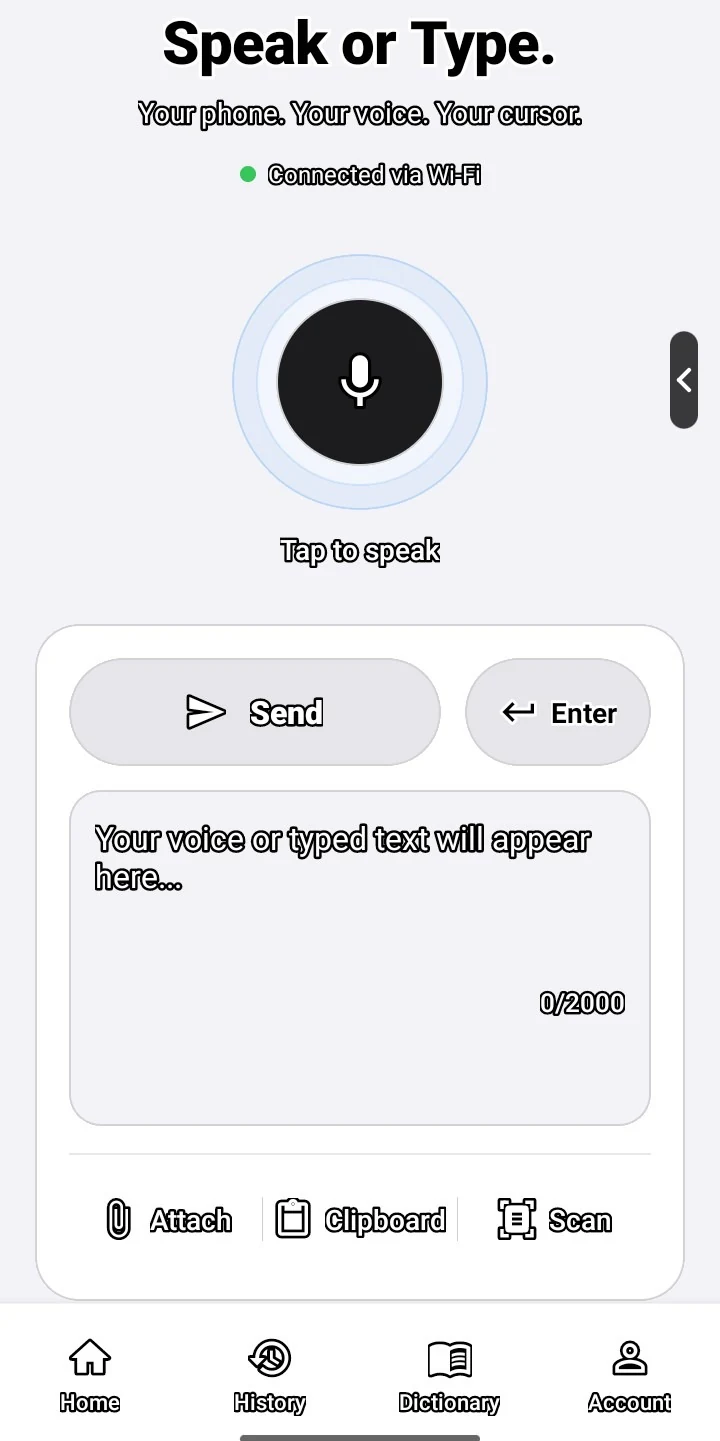
Cursor Flow pairs your Android phone with your Windows PC. Whatever you say or type on either one lands where your PC cursor is blinking.
- Whisper into your phone. Hold it close in an open office and nobody hears a full sentence.
- Use the PC mic when you're alone. One shortcut and you're talking, no phone needed.
- Can't talk at all? Type on your phone in a meeting. It still types on your PC.
Also on Android
# design-teamAre the mockups ready for review?
A voice keyboard
for Android.
Replies, captions and quick notes happen on your phone, where tiny keys are slow and built-in voice typing mishears words and skips punctuation. Speak instead, and get clean text in any app.
- Speak in any app. Tap the mic on the Cursor Flow keyboard in WhatsApp, Gmail, Instagram or anywhere you can type.
- Same clean text. Filler words drop out and punctuation goes in, just like on your PC.
- Nothing extra. It’s part of the Cursor Flow Android app and your plan. No second subscription, no separate app. Turn on the keyboard once in Android settings.
Cursor FlowAutoKBReal work, at the speed of speech.
Emails, replies, code comments, notes. Say it once and it lands clean, right where your cursor is.
Talk like a person.
It writes like an editor.
Fillers drop out, change-of-mind gets fixed, numbers come out formatted. You never go back to clean it up.
Uh, so the budget is twelve thousand, no, fifteen thousand dollars for, um, the first quarter.
The budget is $15,000 for the first quarter.
Change it by saying so.
No keyboard needed.
Already dictated an email? Just say what to change. Cursor Flow AI edits the text in place, right in the app you’re using, and shows you exactly what it changed.
- Say the fix. “Change Thursday to Friday.” Done.
- Reshape the tone. “Make it more formal” rewrites it without losing your meaning.
- See every change. Old words fade out and new ones are highlighted for a moment.
It gets better
the more you use it.
Less fixing, fewer clicks, more time back every day.
Your names and terms, spelled right
Add client names, product words and acronyms once. They come out correct every time, so you stop retyping them.
Speak Bangla, English, or both
Auto detect picks up the language as you talk. Mix them in one sentence and it keeps up.
Hands free when your hands are busy
Say Hey Cursor Flow and start talking. No key, no click, no reaching for the mouse.
Your phone becomes a remote for your PC
Type, dictate, scan or send a file from your phone. It lands on your PC, no headset or cables.
Works without internet
Turn on offline mode and keep dictating on a flight, in a basement, or on bad Wi-Fi.
Files between phone and PC in one tap
Send a photo to your PC or a PDF to your phone, end to end encrypted. No cables, no emailing yourself.
Plain answers about
where your voice goes.
This is how the app handles your data. The privacy policy says the same thing in full.
Offline mode
Recognition runs on your PC. Audio isn’t uploaded.
Cursor Flow Cloud
Audio travels encrypted, only to turn it into text.
Phone to PC
Private on your office Wi-Fi, or securely when you’re away from the desk.
Your history
Stored on your PC. Review or delete it any time.
- Never types into password fields
- Holds your words if no field is selected
- Types like a keyboard; doesn’t paste
- Offline mode on your PC

“I don’t enjoy typing, and I’m an introvert. Speaking into a laptop at my desk feels uncomfortable. I wanted to hold my phone close, speak softly and have the words land right where I was working on my PC.”
Prince Ruhul, founder and solo builder · Read the story
Questions, answered.
How is this different from built-in voice typing?
Built-in voice typing writes exactly what you said, ums included, and only on the device you're holding. Cursor Flow drops filler words, fixes obvious slips with Cursor Flow AI, types word by word into the app you're already in, and lets you hold your phone close as a quiet mic for your PC.
Can people around me hear what I dictate?
They'll hear far less. Hold your phone close and speak softly; a mic near your mouth picks up a quiet voice clearly. A colleague right beside you may still catch some words.
What if I cannot speak out loud at all?
Open the Android app and type there. Tap Send and the text is typed at your PC cursor, the same way spoken words are. Useful in meetings, libraries, or anywhere voice is not an option.
Do I need a headset or a special microphone?
No. Use your PC's built-in mic, or pair your Android phone and use it as a close mic. Nothing extra to buy.
Can I dictate while walking around?
Yes. Talk into the paired phone from anywhere. Even away from the office Wi-Fi, the words type at your PC cursor and wait for you.
Is it OK for confidential text?
For sensitive topics, use offline mode so audio stays on your PC, and speak only where you can't be overheard. If you wouldn't say it out loud at your desk, type on the phone or find a private room.
Can I really talk into my phone and have it type on my computer?
Yes. Pair your Android phone with the Windows app once. Then speak into the phone and the text appears at your PC cursor: Gmail, Slack, Word, Outlook, anywhere you work. It works on office Wi-Fi, or when your phone and PC aren't on the same network.
What if I cannot speak out loud?
Type on the Android app instead. Tap Send and the text is typed at your PC cursor, same as spoken words. Useful in meetings or anywhere voice is not an option.
Does it paste, or type like a keyboard?
It doesn’t paste. Cursor Flow types the words live, one by one, the way a keyboard would. Apps that block paste still work.
Which languages work?
57 languages, including English, Spanish, French, German, Portuguese, Arabic, Japanese and more. Cursor Flow detects the language as you speak.
What happens to my voice?
With Cursor Flow Cloud, audio travels over an encrypted connection only to produce your text. In offline mode, recognition runs on your PC and audio never leaves it. The privacy policy spells out what is stored and for how long.
Is there a Mac or iPhone version?
Not yet. Cursor Flow is Windows + Android for now, so that pairing can be excellent first.
What if it isn't for me?
Every first payment is covered by a money-back guarantee. Ask within 14 days for a full refund, no questions asked.
The domain is cursorfllow.com with an extra L because the spelling without it was listed at a price we could not pay. Read the founder story.
Stop typing what
you could say softly.
Start free with 2,500 words a week. Built for introverts who write around other people.